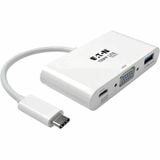
Tripp Lite Usb-C to Vga Adapter with Usb-a Port and Pd Charging White
Login to View Prices
Tripp Lite USB-C to VGA Adapter with USB-A Port and PD Charging, White – 1 Pack – USB 3.1 Type C – 1 x VGA
Additional information
| Brand | Tripp Lite by Eaton |
|---|---|
| Product Type | Graphic Adapter |
| Additional Warranty Informati | <p>3 year limited warranty</p> |
| Connector Type On First End | USB 3.1 Type C |
| Connector Type On Second End | VGA |
| Adapter Type | USB/VGA |
| Connector On First End Details | USB 3.1 Type C |
| Connector On Second End Detai | 1 x VGA |
| Country Of Origin | China |
| Recycled | No |
| Assembly Required | No |
| Height | 0.6" |
| Width | 3.1" |
| Depth | 1.6" |
| Brand Name | Tripp Lite |
| Manufacturer | Tripp Lite by Eaton |
| Product Model | U444-06N-VU-C |
| Product Name | U444-06N-VU-C Graphic Adaptor |
| Manufacturer Part Number | U44406NVUC |
| Manufacturer Website Address | |
| Marketing Information | <p>USB 3.1 Gen 1 USB-C to VGA Adapter expands the potential of your tablet, laptop, Chromebook, MacBook, smartphone or PC's USB-C or Thunderbolt 3 port. Plug-and-play technology makes installation quick and simple – with no software or drivers to install. Fumble-free, reversible USB-C plug connects in either direction for a quick connection every time. To send HD video to a VGA TV, projector or monitor, connect the VGA port to the display using a VGA cable (sold separately). The VGA port supports HD video resolutions up to 1920 x 1080 (1080p) at 60 Hz. The USB-A port accepts USB peripherals, such as a flash drive, mouse, keyboard or printer. Adapter is perfect for transmitting 1080p video to a large display, adding a thumb drive or other USB peripheral, and powering and charging a PD Charging-compliant mobile device all at the same time.</p> |
| Packaged Quantity | 1 |
| Package Contents | <ul> <li>U444-06N-VU-C Graphic Adaptor</li> <li>Owner's Manual</li> </ul> |
| Limited Warranty | 3 Year |
| Additional Information | <li>Platform Supported: PC</li><li>Form Factor: External</li> |